
Kordil Geodesy Tools
Coordinate Transformation and Survey Data Processing
Kordil Geodesy Tools (KGT) is a free Windows desktop application for surveyors, GIS professionals and hydrographic teams. It brings coordinate conversion, datum and projection transformations, transformation-parameter estimation and survey-data processing into one practical workspace.
Work with individual coordinates or batch files, derive transformation parameters from common points, georeference map images and prepare positioning and single-beam sounding records for further use.
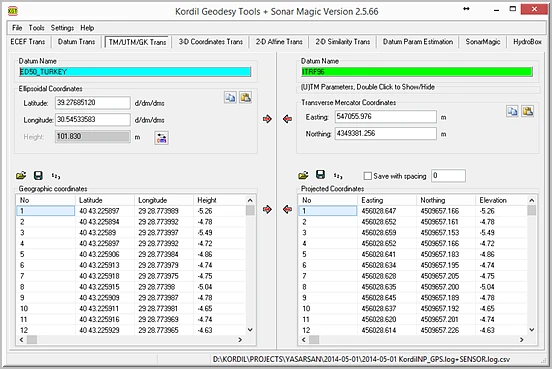
Coordinate Systems, Datums and Projections
- Geographic and geocentric coordinates: convert latitude, longitude and ellipsoidal height to Earth-Centred Earth-Fixed (ECEF) XYZ coordinates and back.
- Datum conversion: define source and destination ellipsoids and seven-parameter transformations, with geographic datum conversions through WGS 84. Save and load reusable
.datumdefinitions. - Projected coordinates: convert between geographic coordinates and Transverse Mercator, UTM or Gauss–Krüger grids. Configure the central meridian, latitude of origin, scale factor and false easting/northing to suit the project.
- Flexible entry: work with decimal degrees, degrees and minutes, or degrees, minutes and seconds, and set the displayed decimal precision.
Transformation Parameters and Control-Point Analysis
Estimate transformation parameters from points with known coordinates in both systems. Least-squares calculations, residuals and reports help assess the fit of the selected common points.
| Tool | Purpose |
|---|---|
| 3D seven-parameter transformation | Apply three translations, three rotations and a scale factor to XYZ coordinates, with forward and reverse conversion. |
| Inverse Helmert parameter estimation | Calculate seven transformation parameters from common 3D points and review transformed coordinates and residuals. |
| 2D six-parameter affine transformation | Fit a planar transformation with translation, rotation, independent axis scaling and shear. |
| 2D four-parameter similarity transformation | Transform planar coordinates using two translations, one rotation and a uniform scale factor. |
These tools support local survey grids, engineering coordinate systems and GNSS data integration. Check axis order, units, datum and projection settings, and use independent check points to assess the resulting transformation.
Coordinate Files, Maps and CAD Exchange
Import and inspect coordinate records in a table before processing. Supported arrangements include point ID with XYZ, XYZ alone, geographic coordinates with height, and XY records in text or CSV files. Batch conversion, clipboard tools and point renumbering simplify repetitive tasks.
- Georeference BMP map images using three control points.
- Inspect KML/KMZ point data in a coordinate grid and drawing preview.
- Export points and labels to DXF for CAD workflows.
- Create KMZ output from coordinate tables, with point and elevation information.
- Filter ASCII message records and set output decimal precision for manual and file-based calculations.
Sonar Magic: Position and Single-Beam Data Processing
Sonar Magic combines time-stamped GNSS GGA records with single-beam echo-sounder logs. It interpolates positions at sounding times and supports depth processing with tide, transducer draft and sound-velocity inputs, including constant values or profiles.
Supported sounding records include SMT, DPT and DBT. Processed results can be exported to CSV for subsequent bathymetric analysis and mapping. Consistent timestamps and clearly defined depth and elevation references are essential to this workflow.
Applications and Everyday Use
KGT supports land surveying, GIS coordinate preparation, construction-grid conversion, hydrographic data processing and teaching of geodetic transformations. Its English and Turkish interface, tabbed workspace and configurable display settings keep related calculations together.
Typical tasks: transform GNSS coordinates into a project grid; estimate local transformation parameters; prepare survey points for CAD or Google Earth; coordinate a scanned map; and combine position and sounding records.
Availability and Support
Kordil Geodesy Tools is distributed free of charge. For the current installation package, documentation and registration assistance, contact geodesytools@kordil.com. Where a function requires registration, use the request process in the application's About window.